

Nano Banana Video Generator
Banana Video AI helps you create Nano Banana Video from text prompts and reference images in one fast online workflow. Turn ideas into short AI videos for social media, promo content, storytelling, and creative visual experiments without heavy editing software.
Free to try for text to video, image to video, and AI video effects
Examples
Nano Banana Video Examples
Every clip below was made with Banana Video AI from the prompt shown. Pick one, try the prompt, and make it your own.
- Text to Video
Golden Retriever Surfing
“A golden retriever surfing a turquoise wave at sunset, slow motion, water spray glittering in warm backlight, action camera following alongside”
Banana V1.5 Pro · 720P · 8s - Image to Video
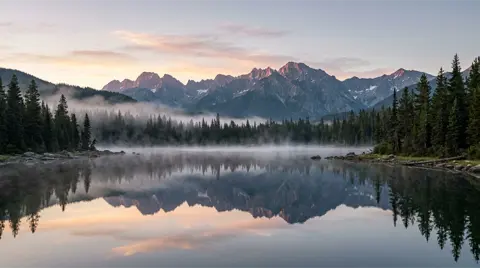
Input Mountain Lake at Dawn
“Morning mist drifts slowly across the lake, gentle ripples spread across the mirror-like water, a few birds fly across the sky, slow cinematic push-in”
Banana V1.5 Pro · 720P · 8s - Text to Video
Rainy Night in Tokyo
“Neon-lit Tokyo alley in the rain at night, a person in a yellow raincoat walks away from the camera, reflections shimmer on the wet pavement, slow dolly-in, cinematic”
Banana V1.5 Pro · 720P · 8s - Text to Video
Product Commercial
“Premium product commercial: matte black wireless headphones slowly rotating on a glossy black pedestal, soft golden rim light, floating dust particles, smooth orbiting camera”
Banana V1.5 Pro · 720P · 8s - Image to Video
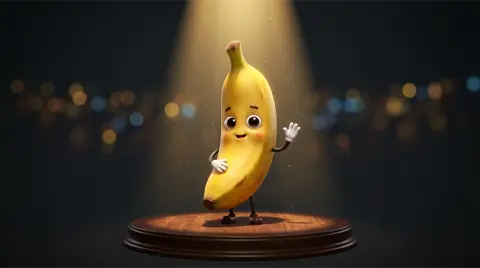
Input Character Animation
“The banana character waves hello, then does a happy little dance with bouncy motion as golden confetti falls, the camera slowly circles around the stage”
Banana V1.5 Pro · 720P · 8s - Text to Video
Banana in Space
“A cute cartoon banana character wearing a white astronaut helmet and spacesuit floats slowly past Earth, soft rim light from the sun, gentle spin, stars twinkling in deep space, cinematic space shot”
Banana V1.5 Pro · 720P · 8s
Core Highlights
5 Next-Level Capabilities of Banana Video AI
Banana Video AI goes beyond basic generation tools. These core capabilities make Nano Banana Video creation faster, more flexible, and more usable for real content workflows.
Prompt-to-Video Creation
Turn a simple text prompt into a short AI video with motion, atmosphere, and visual direction. Banana Video AI helps you move from idea to usable video content without a complex editing workflow.
Image-Based Motion Generation
Start from a single image and add movement, transitions, and scene energy. This works especially well for product visuals, portraits, illustrations, and concept art that need more life.
Cinematic Effects Without Editing
Create stronger visual impact with dynamic effects, stylized motion, and more expressive scene transitions. Banana Video AI makes it easier to generate polished video looks without relying on traditional editing software.
Smoother Motion and Camera Flow
Shape how scenes move with better control over pacing, direction, and camera feel. From subtle motion to more dynamic shots, your videos can feel more intentional and visually guided.
Fast Browser-Based Workflow
Go from prompt or image to video in a fast online workflow. No heavy software, no complicated setup, and no powerful local machine required to start creating Nano Banana Video.
Key Benefits
Why Creators Choose Banana Video AI
Banana Video AI is designed for people who want to create Nano Banana Video with less friction, faster iteration, and more practical control over the final result.
- 01
Free to Start
Try the core workflow before upgrading. It is an easy way to explore Nano Banana Video creation without committing too early.
- 02
Faster from Idea to Output
Move from a prompt or image to a usable video much faster. Banana Video AI is built for quick testing, fast iteration, and lightweight content production.
- 03
Less Friction, More Creation
Skip the complexity of traditional editing workflows. The platform keeps the process simple so you can focus more on ideas, scenes, and visual direction.
- 04
Flexible Across Devices
Create from desktop, tablet, or mobile without being tied to one machine. Everything runs online for a more flexible workflow.
- 05
Ready for Real Content Work
Whether you are creating for social media, product marketing, storytelling, or content experiments, Banana Video AI fits real publishing and production needs.
- 06
Works for Creators and Teams
From solo creators to marketing teams, the workflow is designed to make video creation more approachable, repeatable, and efficient.
Use Cases
What You Can Create with Banana Video AI
Banana Video AI fits a wide range of Nano Banana Video use cases, from fast-moving social content to product storytelling, educational visuals, and creative experiments.
How It Works
How to Use the Nano Banana Video Generator
Creating videos with Banana Video AI is simple. Start with an idea, prompt, or image, then turn it into a finished AI video in just a few steps.
- STEP 01
Choose Your Starting Point
Pick text to video, image to video, or an effects-based workflow depending on what you want to create.
- STEP 02
Describe the Scene
Write a prompt or upload a reference image. Add details like motion, mood, style, camera direction, or atmosphere.
- STEP 03
Generate the Video
Click generate and let Banana Video AI turn your idea into a polished video online.
- STEP 04
Download and Share
Save your finished video and use it across social media, creative projects, product content, and more.
Platform Features
Platform Features That Support Real Creation
Banana Video AI includes the practical platform features users expect from a modern Nano Banana Video workflow, making it easier to create, adapt, and publish video content across different needs.
Flexible Aspect Ratios
Create videos in landscape, portrait, or square formats for YouTube, TikTok, Instagram, websites, and paid campaigns.
High-Quality Video Output
Generate video content that looks clean, usable, and ready for publishing across marketing, social, presentation, and creative use cases.
Cloud-Based Rendering
Everything runs online, so you can generate videos without installing software or depending on a heavy local production setup.
Faster Production Flow
Reduce the time between idea and output with a workflow built for faster testing, quicker iteration, and more efficient content production.
Easy Browser Access
Start creating from almost any modern browser without extra tools, complicated setup, or device-specific editing environments.
Made for Creators and Teams
Banana Video AI supports solo creators, marketers, in-house teams, and businesses that need a more practical way to create AI video content.
Reviews
What Users Say About Banana Video AI
Creators, marketers, and business users use Banana Video AI to turn ideas into video content with less time and less production friction.
FAQ
Nano Banana Video FAQ
Have questions about Banana Video AI? Find answers below or contact us at [email protected].
Create Your First Nano Banana Video
Turn text prompts and images into short AI videos with a faster online workflow. Try Banana Video AI free and start creating in minutes.